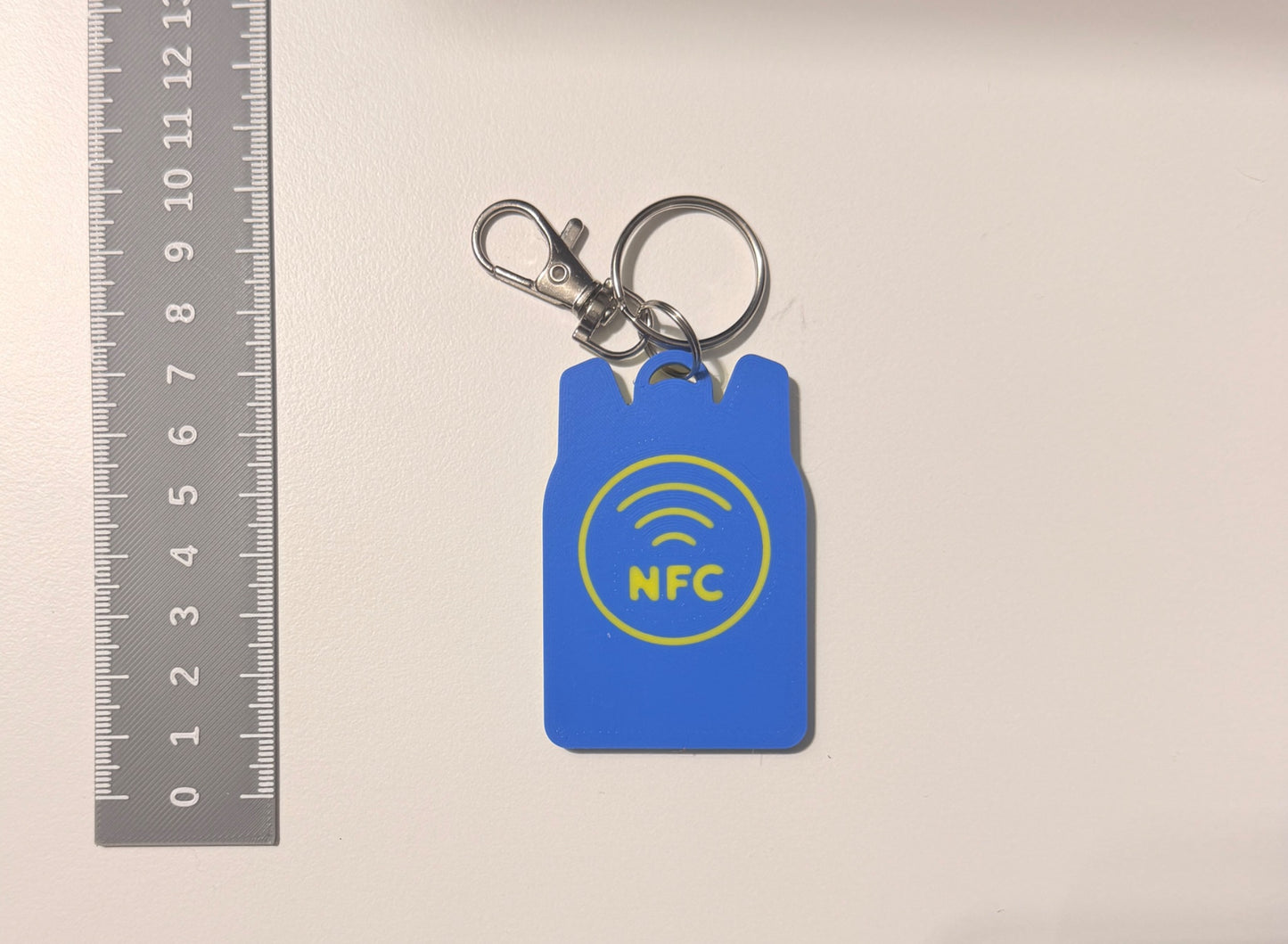
NFC Safety Keychain Kids Backpack Emergency Contact
Smart Kids Backpack Emergency Contact NFC Safety Keychain
Keep your peace of mind close by during the school day! Specially engineered for backpacks, lunch boxes, and school trips, this Smart Emergency Contact Keychain bridges the gap between child safety and instant smart tech. Hidden completely inside this vibrant, 3D-printed miniature backpack charm is an embedded NFC (Near Field Communication) chip. If your child ever gets separated from you, loses their smartphone, or faces an unexpected emergency, any adult can simply tap their smartphone against the keychain to instantly bring up your preset contact details, medical alerts, or safety profiles.
No complicated apps for the helper, no monthly tracking subscriptions, and zero batteries required—just instant, reliable proximity protection.
Why Parents Love It
- Clear, Actionable Instruction: Bold, raised text explicitly reads "TAP FOR EMERGENCY CONTACT" to guide any adult or first responder exactly on what to do in a crisis.
- Instant Tap-to-Scan Setup: Works natively with modern Apple iOS and Android smartphones without requiring external software downloads or profile logins.
- Fully Customizable & Re-writable: Use free mobile utilities like NFC Tools to easily program your mobile numbers, child's allergies, or custom ICE web links. Update the text as your information changes.
- Built Tough for School Gear: Light enough for toddlers to carry, yet professionally 3D-printed using high-grade, impact-resistant filaments that withstand rainy playgrounds and heavy backpack drops.
How It Works
- Clip It: Snap the heavy-duty lobster clasp onto your child's favorite school bag or jacket zipper loop.
- Program It: Hold your smartphone near the tag and use a free app to securely save your emergency contacts to the internal chip in seconds.
- Tap It: In a busy crowd or crisis, a helper simply holds their smartphone over the text banner to read your programmed safety instructions instantly.
Specifications & Dimensions
- Design: High-Contrast Miniature Backpack Silhouette
- Dimensions: Approximately 7.5 cm tall (3 inches) and 5 cm wide—carefully sized alongside a ruler for optimal visibility without weighing down small bags.
- Chip Type: Premium, high-performance re-programmable NTAG NFC Chip.
- Attachment Assembly: Heavy-duty chrome split ring with a smooth-action swiveling lobster claw clasp.
- Material Composition: Waterproof, dual-color matte 3D-printed filament with a distinct high-grip micro-texture.
"Why Choose Our Smart Medical Tag?"
- 💸 Zero Monthly Fees
- No subscriptions, no sign-ups, and no hidden costs. Buy it once, use it forever.
- 🔋 No Batteries Required
- Completely passive technology. It never needs to be charged and never runs out of power.
- 🔄 Endlessly Re-programmable
- Move, edit, or update your emergency links and phone numbers anytime using a free mobile app.
- 🌧️ 100% Waterproof & Tough
- The microchip is completely sealed inside durable, weather-resistant 3D-printed housing.
"How It Works" Visual Guide
- 1. Code It 📱 -> Download the free NFC Tools app and type your emergency contact details or medical URL profile.
- 2. Tap It 🤝 -> Hold the back of your smartphone against the red tag for two seconds to lock in your data.
- 3. Scan It 🚨 -> In an emergency, first responders tap their phone to instantly see your critical health info.
How to Set Up Your Smart Medical Alert Keychain
Thank you for choosing our Smart Medical Alert NFC Keychain! Follow these simple steps to securely store your vital health information or emergency contact details on your new tag.
Step 1: Download a Free NFC App
To write your information to the keychain, you will need a free configuration app on your smartphone:
- iPhone & Android: Download NFC Tools from the Apple App Store or Google Play Store.
Step 2: Prepare Your Information
Decide what you want a first responder or helper to see when they scan your keychain. You can write:
- A Text Block: Type your name, blood type, severe allergies, conditions, and Emergency Contact numbers directly into the app.
- A Medical Profile Link: Link directly to a secure online medical portal (like an iPhone Emergency Medical ID link or a custom landing page link).
Step 3: Write Data to the Keychain
- Open the NFC Tools app on your phone.
- Select the Write tab.
- Tap Add a record and choose either Text or URL/URI depending on what you prepared in Step 2.
- Input your information and tap OK.
- Tap Write / [Size] Bytes at the top of the screen.
- The Magic Step: Hold the top-rear of your smartphone directly against the red circular keychain. Keep it completely still for 2 seconds until you see a green checkmark or hear a confirmation chime!
Step 4: Test Your Tag
Close the app completely. Lock and unlock your phone, then hold the top edge of your smartphone directly against the keychain as if you were making a contactless payment. Your customized medical profile or text summary should instantly pop up on your screen!
⚠️ Important Note: Make sure your smartphone's NFC feature is turned on in your device settings. For iPhones, the sweet spot for scanning is near the top camera rim; for Android devices, it is typically located in the middle of the back panel.